
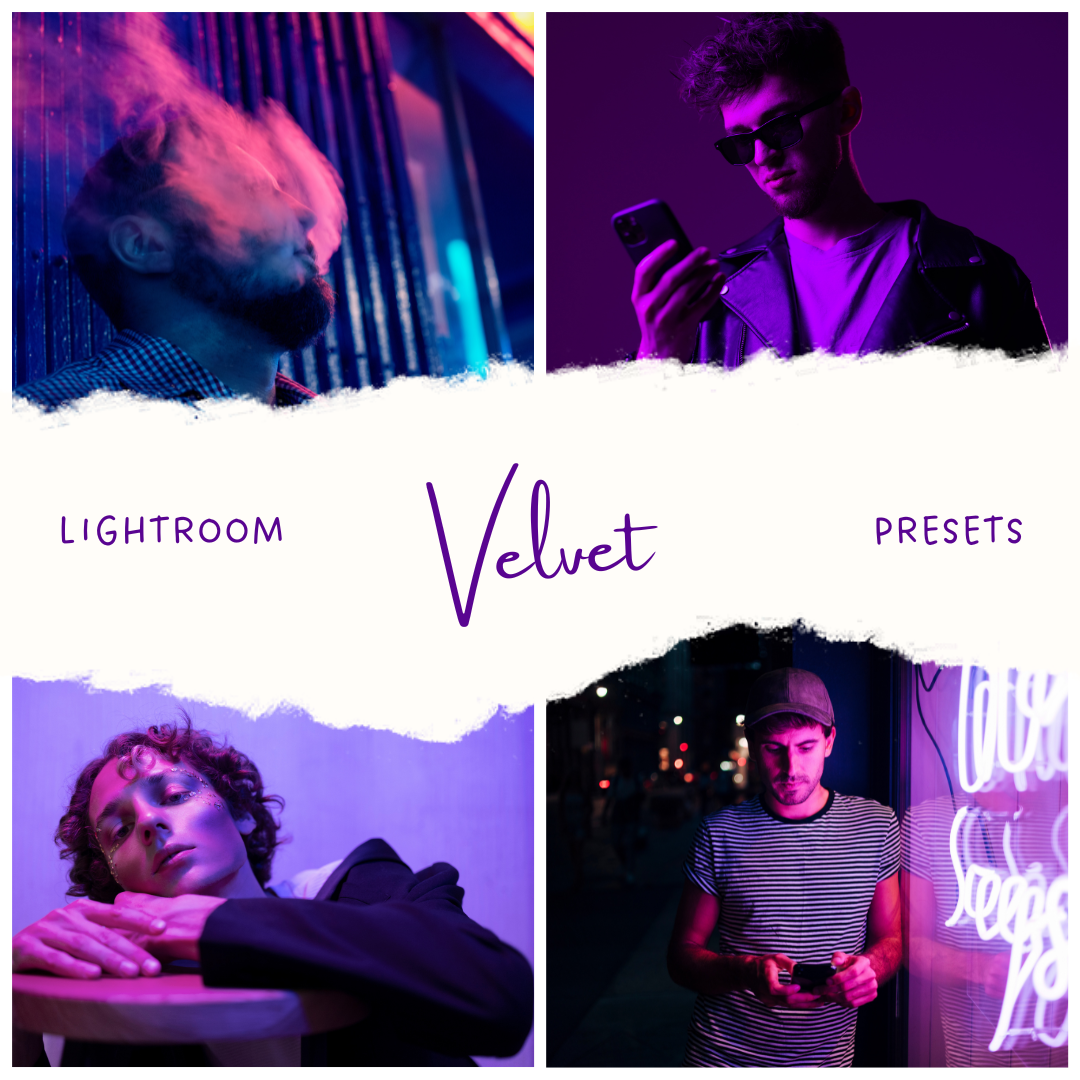
LR Preset: Velvet — Preset Trio
Original price was: $34.60.$28.76Current price is: $28.76.
A neon-forward pack built around rich purples, electric pinks, and deep nighttime contrast, with three distinct variations inside.
Velvet One
A high-energy neon split that pushes magenta highlights against cooler blue shadows.
-
Tone & color: Strong pink/purple in lights, cooler cyan-blue in the darker areas for clear separation.
-
Light & contrast: Crisp pop in highlights with a defined contrast curve; midtones feel punchy.
-
Overall feel: Dynamic and modern—more “electric” than soft.
Velvet One leans into a vivid two-tone look where bright areas glow hot (magenta/pink) while the shadow side stays cooler and cleaner. Colors feel intentionally separated rather than blended, giving frames a bold, graphic presence. The result reads sharp, energetic, and distinctly neon.
✅ Magenta vs blue separation
✅ Punchy mids and highlights
✅ Electric, high-impact mood
Velvet Two
A purple-dominant wash that smooths tones into a cohesive, dreamy neon haze.
-
Tone & color: Violet stays on top across the frame, with less emphasis on cyan separation.
-
Light & contrast: Softer contrast and gentler transitions; highlights feel rounded and diffused.
-
Overall feel: Dreamy, atmospheric, and unified—more “glow cloud” than edge.
Velvet Two keeps the palette tightly centered on purples, creating a consistent color atmosphere from shadows through highlights. Instead of hard separation, tones blend into a softer gradient that feels more fluid and cinematic. The overall impression is smoother, calmer, and more immersive.
✅ Uniform violet atmosphere
✅ Softer contrast, smoother roll-off
✅ Dreamy neon haze feel
Velvet Three
A darker neon noir variant with deeper blacks and stronger spotlight-style highlights.
-
Tone & color: Purples remain present, but darker tones feel heavier and more grounded.
-
Light & contrast: More density in shadows with brighter highlight punch; stronger depth overall.
-
Overall feel: Moody, nocturnal, and cinematic—neon signs against night.
Velvet Three emphasizes depth first: shadows sit lower and carry more weight, while bright elements stand out like focused light sources. Color stays stylized, but the overall balance feels darker and more dramatic, giving frames a more serious, noir-leaning atmosphere.
✅ Deeper blacks, stronger depth
✅ Highlight punch with controlled spill
✅ Cinematic, moody night vibe
Related products
Lightroom Presets
Lightroom Presets
Lightroom Presets
Lightroom Presets
Lightroom Presets
Lightroom Presets
Lightroom Presets
Lightroom Presets